Use your exhibit against the motion
The other side compares an asserted deadline with the agreement and later emails. Motion test places the motion’s statement beside the conflicting record for the lawyer to assess.
Motion test →Practice areas / Civil litigation
A date in an exhibit, a witness’s qualification or an omitted contract clause can change an argument. Cortega Legal reads the motion, testimony and evidence from the other side’s position and ties each challenge to the record.
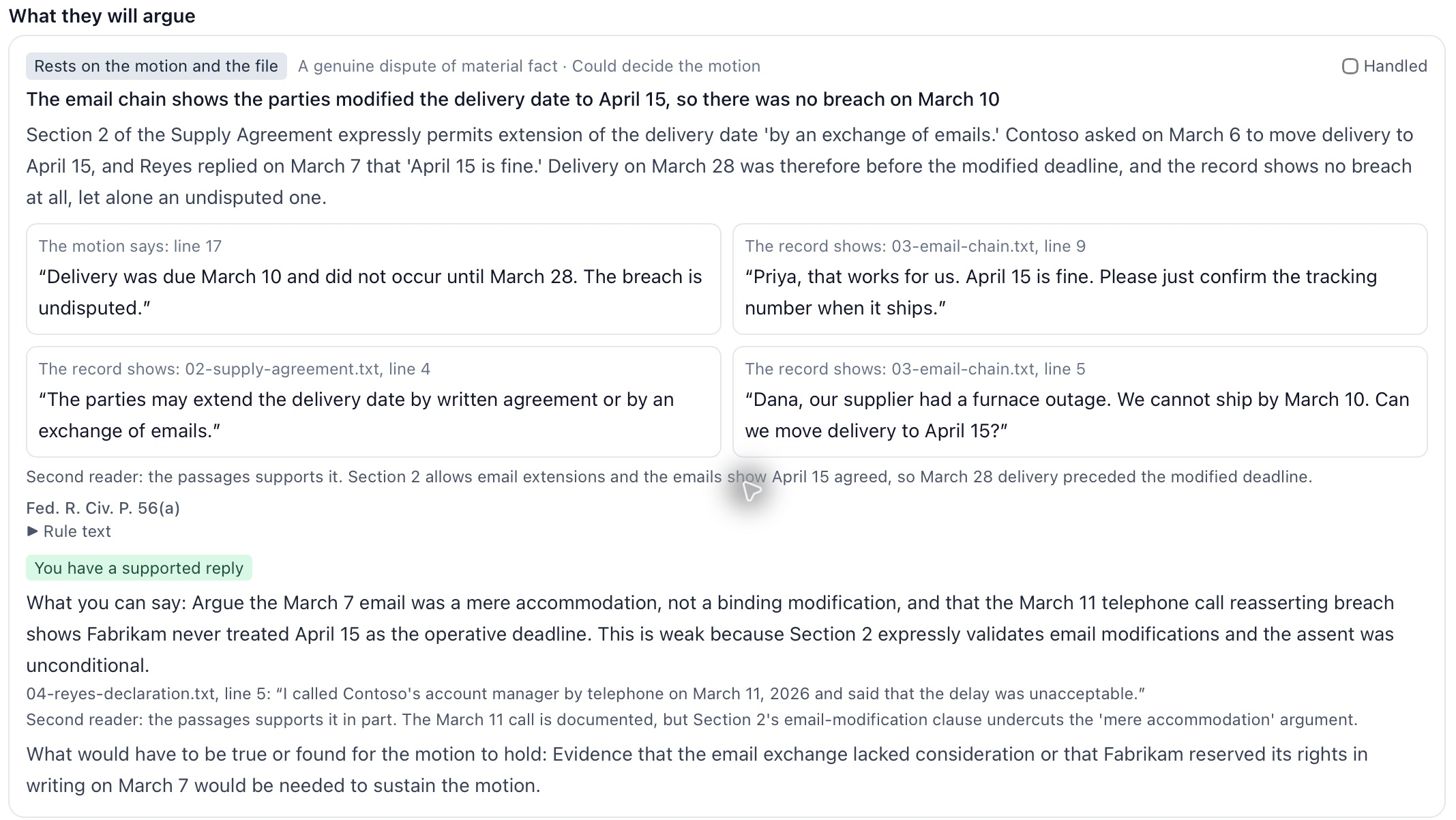
The other side’s playbook
The other side compares an asserted deadline with the agreement and later emails. Motion test places the motion’s statement beside the conflicting record for the lawyer to assess.
Motion test →A damages figure may depend on a management assumption. Expert pressure test identifies the report’s stated data and method and the supporting material the file does not establish.
Expert pressure test →A declaration may give a different date from an earlier account. Impeachment map brings the passages together and shows the questions that discrepancy could raise.
Impeachment map →The requesting party may argue that an objection exceeds the request. Discovery objections shows that reply beside the proposed response and remaining production duties.
Discovery objections →An appeal may omit preservation, a review standard or another basis for judgment. Appeal map reads the ruling with the supplied record and identifies the unresolved issue.
Appeal map →Your matter, step by step
Decide what the documents establish before choosing a theory. The five-stage Intake review inventories the file, extracts facts and dates, answers questions and identifies gaps. Keep the agreement, correspondence and witness material together for later reviews.
Intake review →Select the court, event and trigger date. Review any additional date requested by the calculator, then inspect the counting steps and source status. Check the applicable orders before entering the result into the calendar.
Civil deadlines →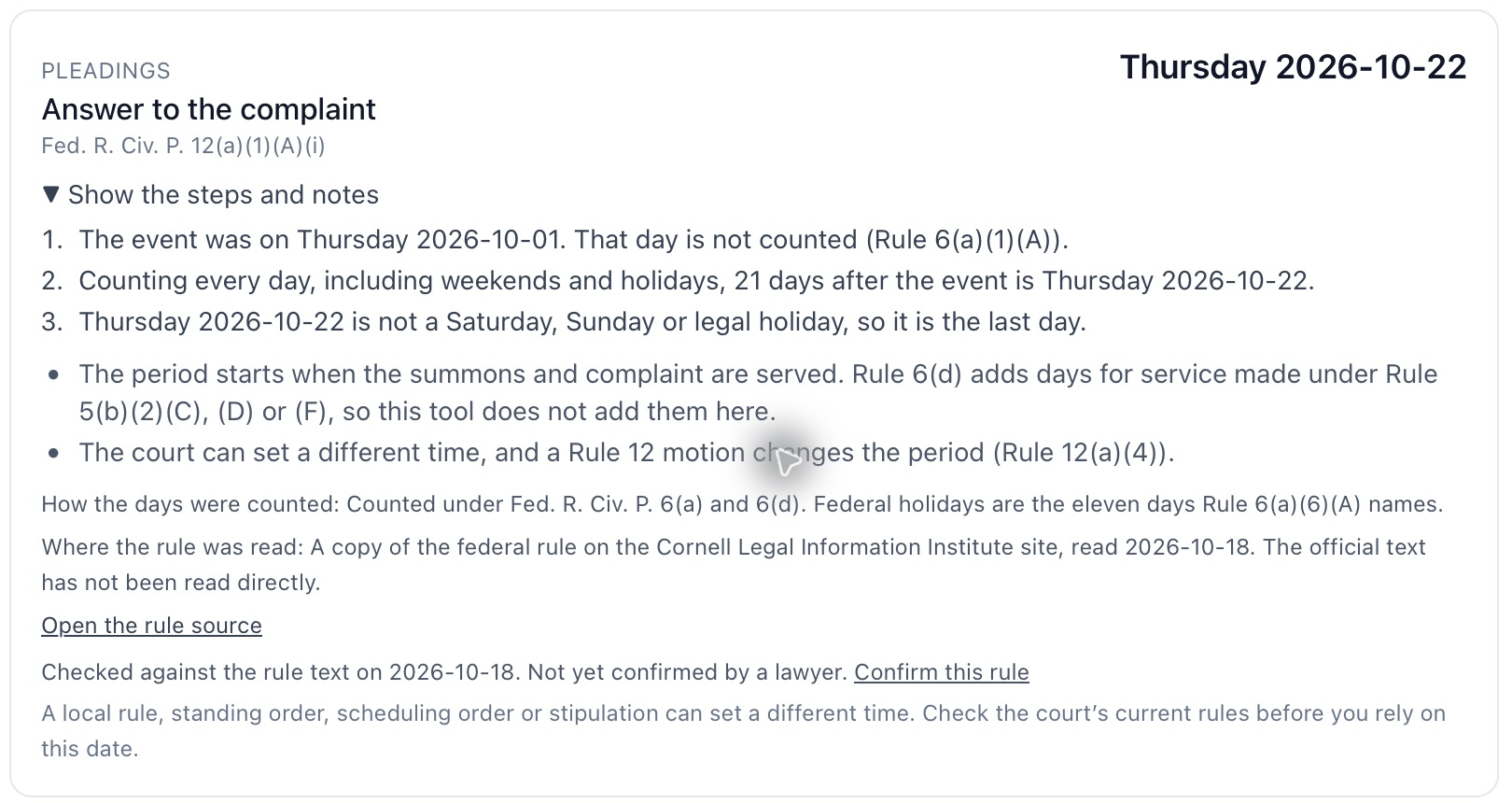
Upload the requests and identify the responding party. Examine whether each objection fits, how the requesting party could answer it and what still needs production. The lawyer makes the privilege and production decisions before service.
Discovery objections →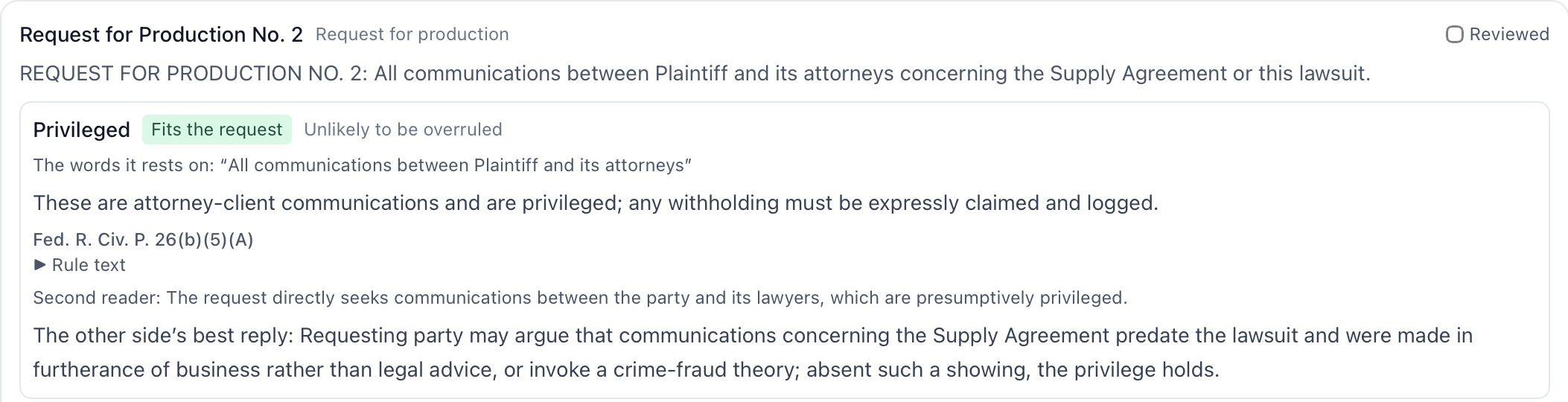
Test the draft’s assertions against the exhibits. Motion test addresses dismissal and summary judgment; Stress test examines the broader argument and possible surprises. Read the proposed reply and identify what further evidence would be needed.
Motion test and Stress test →Provide the report and its supporting financial or technical records. Review qualifications, assumptions and method against the actual file and available disclosure-rule text. Decide what further material or explanation to request.
Expert pressure test →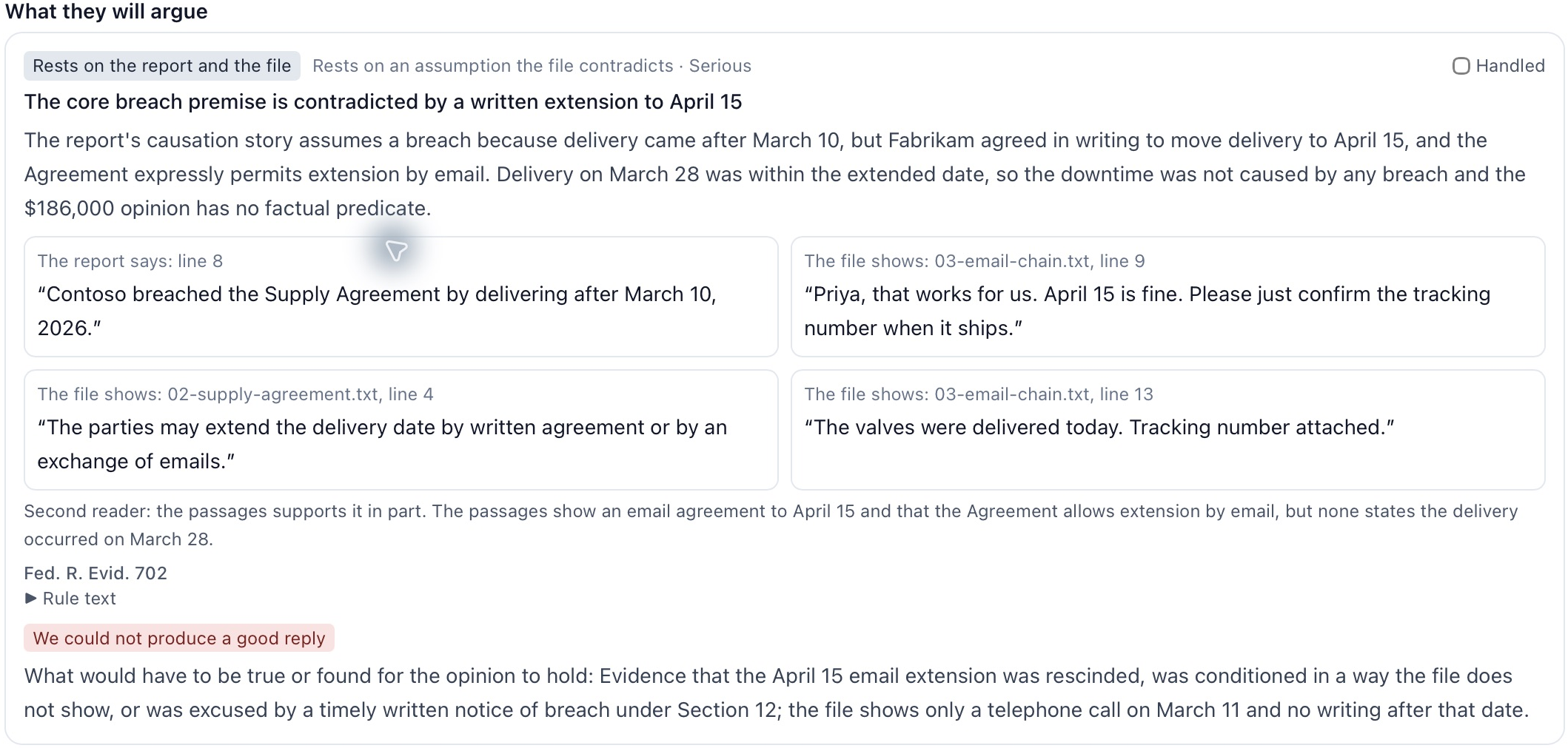
Find discrepancies with Impeachment map, inspect likely questions with the Cross-examination list and compare practice answers with the file in Practice room. Discuss the underlying facts with the witness rather than scripting a preferred answer.
Witness preparation →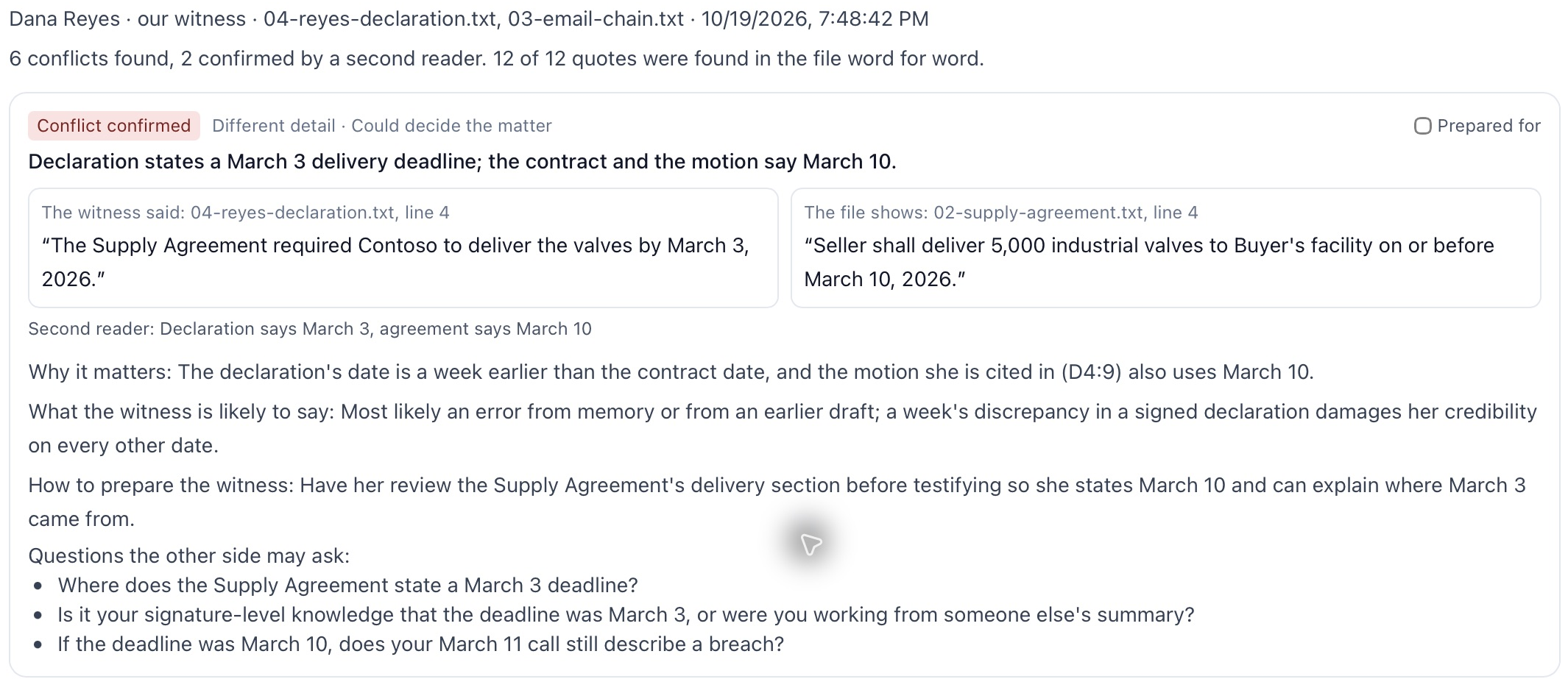
Read an adverse ruling with the objections and hearing record. Appeal map identifies issues, preservation and available dates. Before filing the next paper, use Ready to file? and separately check local rules and standing orders.
Appeal map and Ready to file? →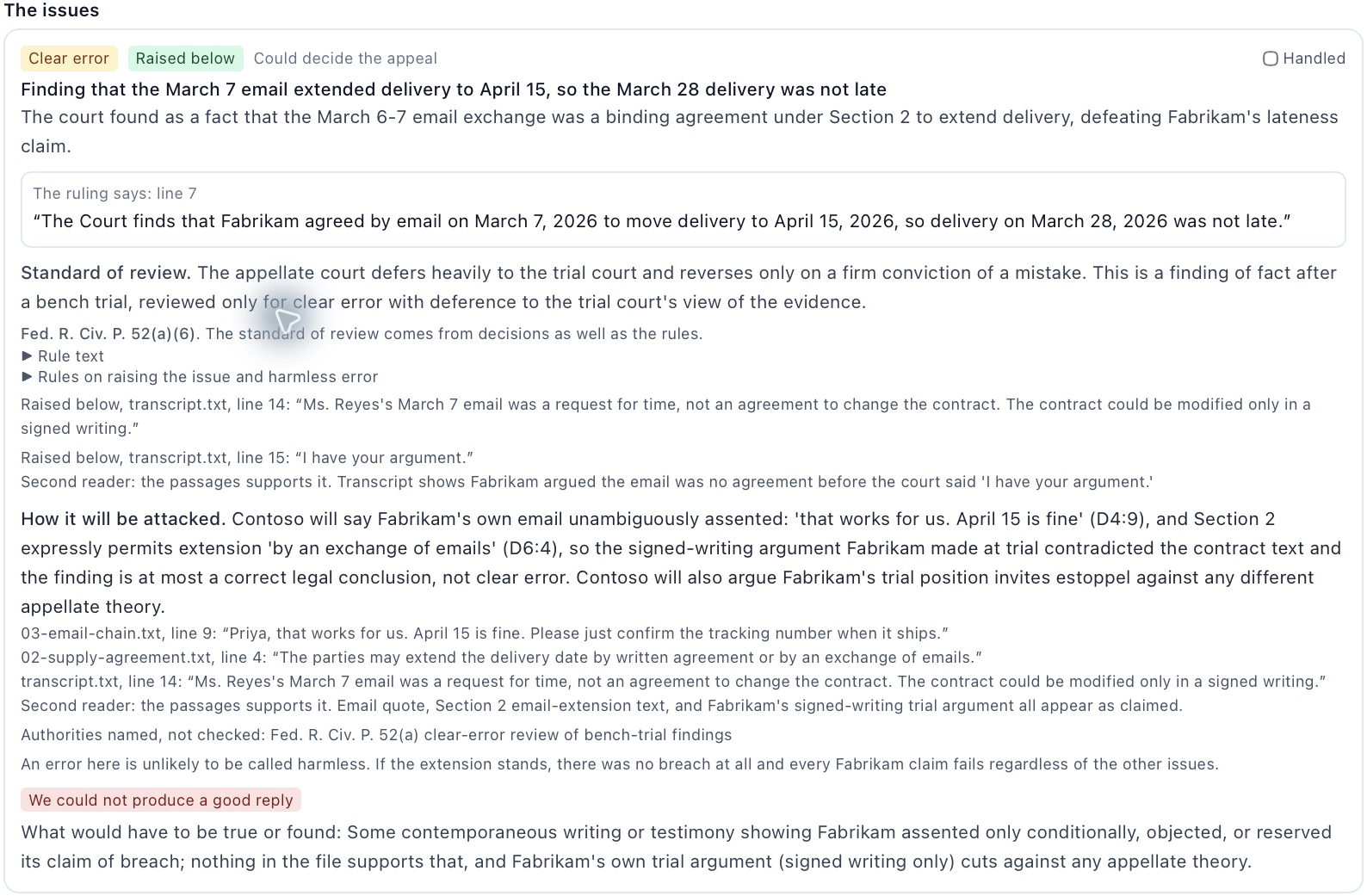
Invented sample documents
The invented file contains a summary-judgment motion, supply agreement, email exchange, declaration and delivery records. The motion relies on a March 10 deadline and seeks lost profits.
Motion, line 17“Delivery was due March 10 and did not occur until March 28. The breach is undisputed.”
Buyer email, line 9“Priya, that works for us. April 15 is fine. Please just confirm the tracking number when it ships.”
The agreement permits an extension by email. Motion review identifies that extension as a challenge to the asserted breach. The lawyer examines the complete correspondence before choosing a reply.
The result identifies missing support for an answer to the extension. It asks for evidence about the acceptance, authority or a later change. A handled mark records follow-through; it does not validate the conclusion.
What it reads
Provide the paper being tested, the exhibits it relies on and opposing material. The tool needs the source, not just the draft’s description.
Keep declarations, earlier statements, expert reports and supporting records together. Identify which witness or report is being tested.
Provide the requests, order and relevant transcript. Enter dates when a calculation needs them; a missing trigger remains a question to resolve.
Argument and evidence review, witness preparation, discovery responses and civil deadlines. The available rule text varies by tool and court.
What comes back
Attack results rank difficult points, separating source-supported answers from issues that need evidence or correction.
Read each quotation in context. A word match checks the source; the lawyer still assesses the legal conclusion.
Missing facts and unread material stay explicit, with the question they leave open and how to investigate it.
Attack-result check boxes record the lawyer’s follow-through after the underlying issue has been addressed.
Courts and rules covered
These are the tool packs’ recorded source-reading dates, not a statement that every rule is current or covered. The lawyer checks the applicable text, local rules and orders for the actual matter.
| Court or source | What was read | Date checked | Gaps |
|---|---|---|---|
| Federal civil deadlines | Selected civil-event rules; Cornell LII copy. | 18 Oct 2026 | Local rules, standing orders and additional triggers still need review. |
| Maryland civil deadlines | Selected rules from the Maryland Judiciary-linked Code and Court Rules text, current through 1 Sep 2026. | 18 Oct 2026 | This is deadline coverage, not general Maryland attack-tool coverage. |
| Virginia and D.C. civil deadlines | Selected court-rule text; Virginia order and Vaquill rule copies as identified in each result. | 18 Oct 2026 | The source status and unconfirmed items remain visible in the calculation. |
| Federal motion, expert and appeal review | Selected procedure, evidence and appellate excerpts; Cornell LII copies. | 19 Oct 2026 | Official source text was not read directly. Circuit-specific decisions are not included in Appeal map. |
| Virginia and D.C. motion, expert and appeal review | Selected court-rule excerpts from the identified rule snapshot. | 19 Oct 2026 | Official PDFs were not read directly. Virginia demurrer and expert statutes were not read. |
| Discovery objections | Selected federal, Maryland, Virginia and D.C. procedure excerpts; source shown by court. | 18–19 Oct 2026 | Maryland Rules 2-402 and 2-403 were not read; scope, privilege and burden objections need that research. |
| Maryland motion, expert and appeal review | No Maryland rule excerpts in these tool packs. | No text read | The lawyer must check the motion, evidence, expert and appellate standards independently. |
Authorities named in attack results carry their check status. A quoted rule excerpt does not verify every authority or establish that a proposed argument applies.
Questions
It reads the brief or argument selected for review and the supplied matter documents. Include the exhibits, correspondence and witness accounts needed to test the position. It cannot examine a document that has not been provided.
The result identifies arguments, weaknesses and unknowns rather than a win probability. A source-supported counterargument is something for the lawyer to assess in context. The lawyer decides what to argue, revise, serve or file.
Coverage is specific to the tool. Maryland civil-deadline rules and selected discovery-procedure rules are included, with their sources shown. Maryland motion, expert, evidence and appellate rule gaps remain explicit; they must not be treated as covered by those attack tools.
It proposes objections and a response for each request and identifies what still needs to be produced. The other side’s likely reply is included for review. The lawyer decides what is justified and what to serve.
The result identifies a quotation and its document location and shows its match status. A matching quotation establishes that the words occur in the file. It does not establish that the proposed legal reading is correct or that an authority has been verified.
A practice can connect private models inside its network, foundation models or a combination. It can use its own provider keys. Deployment choices include on premises, the practice’s AWS account and rented GPUs.
Cortega Legal
Discuss the documents, the work and the practice’s deployment.