Send it a contract. Get the answer back.
Email it, message it in Teams, or open it in Word. Cortega checks your contracts and case files against your rules, lists the deadlines, and quotes every clause. A lawyer always decides.
 In TeamsScroll the conversation
What changed in Northwind’s draft, and does it break our rules?
Northwind-MSA-v1.docx Northwind-MSA-v2.docx Our-playbook.docx
Three changes break your rules.
1. Clause 9: the liability cap is gone. Edited with tracked changes off.2. Clause 5: the residuals clause is wider.3. Clause 14: renewal moved to 24 months.Each clause is quoted. Open them and decide.
When is notice due, and does the price change?
Notice is due 30 September, 90 days before the 29 December renewal. The price rises 5% on renewal.
Both are on your Deadlines page for you to confirm.
Northwind-dates.icsWrite a short summary for Sales.
Northwind renews on 29 December for 12 months at a price 5% higher. To end it, notice is due 30 September. Sales should decide by 15 September. Read it, then send it on or edit it.
Mark up their draft with our fallback wording.
Done. Each change is tracked in Word, and each comment names the playbook rule behind it.
Northwind-MSA-v2-marked.docxExample. Names and documents are invented.
 In WordThe file it sends back
5. Residuals. Either party may use anything its staff remember. Residuals exclude technical know-how and trade secrets.
9. Liability. Liability is not limited. Each party’s total liability is capped at the fees paid in the 12 months before the claim.
14. Renewal. This agreement renews for 24 12 months unless notice is given 90 days before.
It opens in Word with every change tracked. Each comment names the rule behind it. Accept or reject as you would from a colleague.
For litigatorsBefore you fileYour motion to suppress the statement
The other side argues the stop was lawful and the warning was given. Three weak points:
1.The motion says no warning was given. The body camera log at 21:42 says “rights read.”2.The motion does not address the consent form signed at 21:50.3.Unknown: whether the stop was recorded.Where the statement conflicts with the record
Cross-examination questions come in the order a lawyer would ask them.
Statement, ¶4“I left the house at 8.”Phone record“Call from the house, 9:12.”Both passages are quoted. Impeachment is ready.
Counted from the event, with the rule
On your Deadlines page for you to confirm. Calendar file included.
Where two documents disagree
Agreement“Husband’s brokerage account is not listed because it was acquired after the separation.”Account history“18 November 2025: transfer of $88,000 from joint checking to Northfield Brokerage.”You press Yes if it is a real problem for your matter, or No if the check got it wrong.
Example. Names and documents are invented.
Four ways in
Send documents to your Cortega address and ask in plain words. The answer comes back by email, with a marked-up Word file. Reply to keep the conversation going.
Teams
Message it like a colleague. Add the documents, ask the question, and keep each matter in its own thread.
Word
Open Cortega beside the contract you are working on. Compare drafts, check your rules and see the dates without leaving Word.
Sign in
Open Cortega in your browser to work on a matter, review a contract, confirm dates and manage your playbook.
In CortegaThe matter chat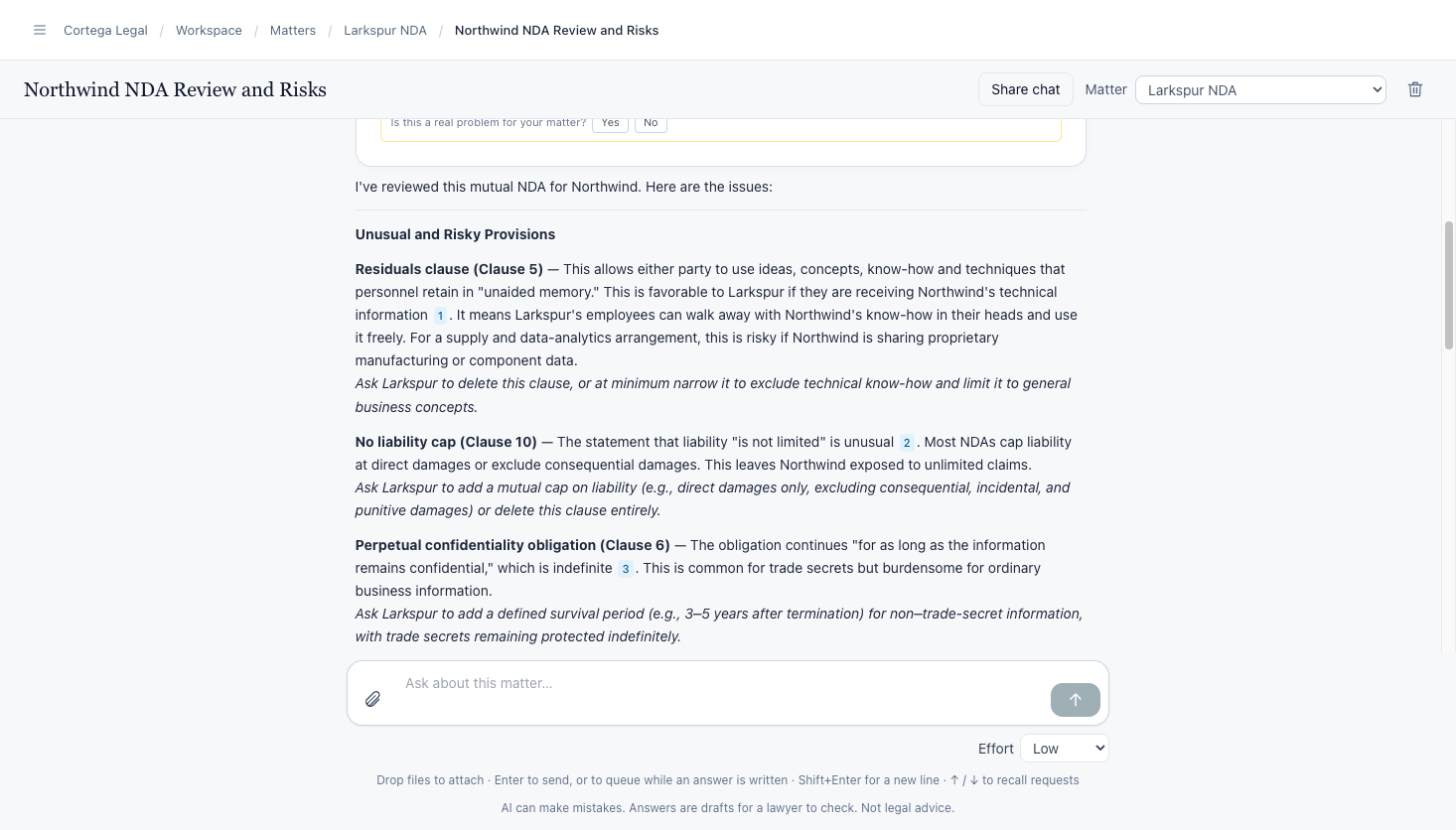
Review a contract in the matter chat. Each issue names the clause and says what to change.
In CortegaDeadlines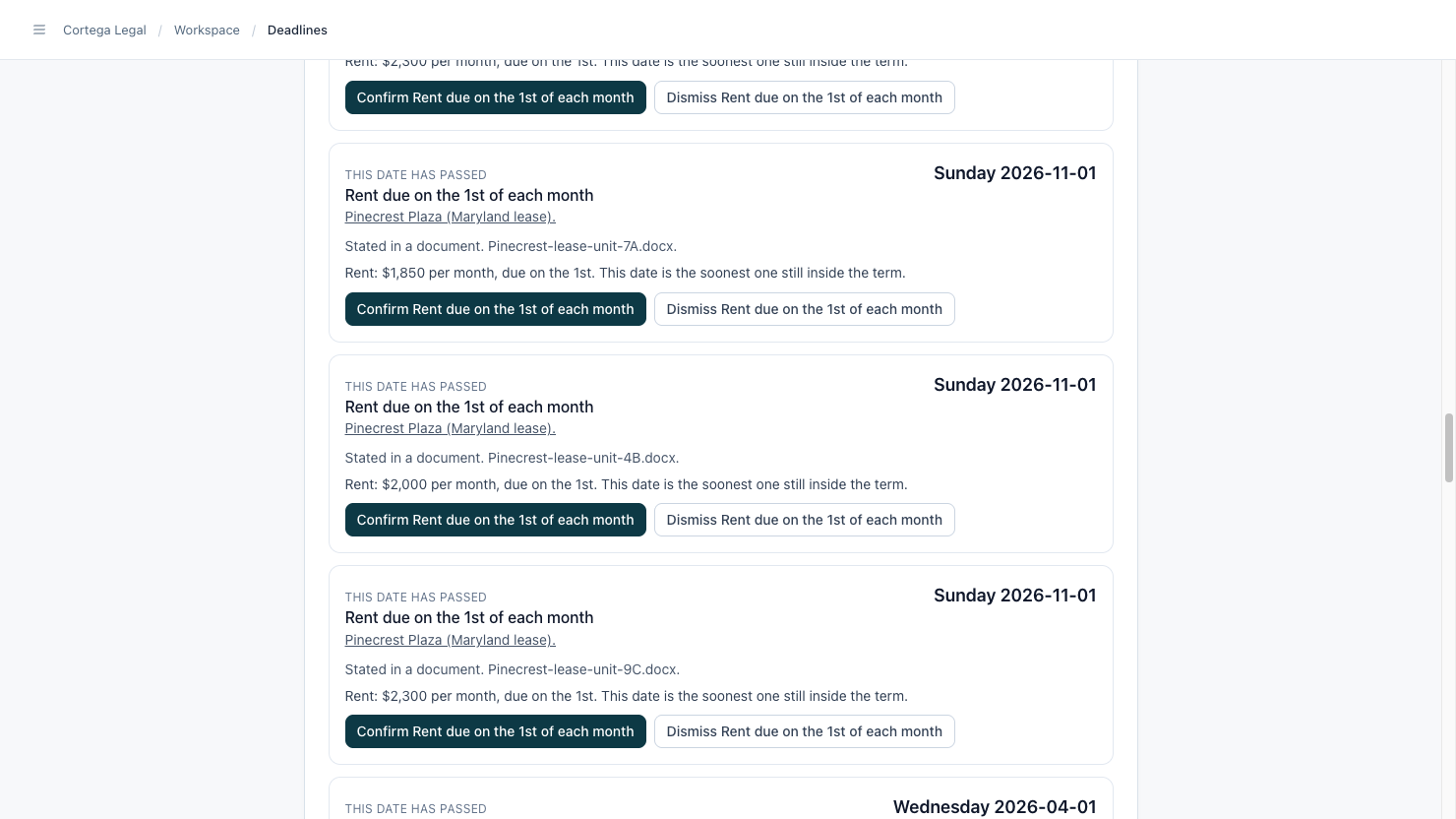
Confirm every date on one page. Each one names its document, and you confirm or dismiss it.
Built for in-house counsel and for litigators
If you are in-house counsel
Colleagues ask you questions all day and send you contracts to sign. Cortega checks each contract against your own rules, so you answer faster and miss less.
- Send a contract by email or Teams and get the review back
- Review a contract against your rules, with the clause quoted
- See every change in the other side's draft, even edits Word did not mark
- Keep renewal and notice dates before they pass
- Handle employment, privacy, competition and regulatory work
If you litigate
Before you file, Cortega argues the other side against your work and shows where it is weak. It counts your deadlines and shows the rule behind each one.
- Test a motion, a brief, a discovery response or an expert report
- Prepare the witness and the cross-examination
- Count deadlines from the event, with the rule shown
- Civil, criminal, family, real estate, and trusts and estates
Manage patents? Patent work comes with in-house.
Check a draft application
Claims, figures and reference numbers, before you file.
Chart a patent against a product
With the passages quoted.
Search for prior art
And for patents in force that a launch might meet. Each result states its limits.
Track the deadlines
Prosecution and maintenance dates, and patent term.
Add two plugins to Cortega Legal.
Cortega Legal reads, checks and quotes. These two change how your department works.

Sidebar
Your colleagues ask Legal in Slack or Teams. Sidebar takes the question, asks for what is missing and drafts the answer. You approve it before they see it.

Opposing Counsel
A lawyer whose job is to beat you argues your matter first. Before you file, before you sign, before you walk in.
A week in your practice
A colleague asks, “Can we sign this?”
They ask in Teams or Slack. You review the contract against your rules and send one answer back.
The other side sends back their changes
Cortega lists every change, including edits Word did not mark, and what each one means for you.
Renewals pile up at year end
Send the stack. Get every notice date, renewal term and price increase in one list, with a calendar file.
You are about to file a motion
Cortega argues the other side first and shows where your motion is weak.
Your witness testifies on Monday
Practise the cross-examination, and see where the statement conflicts with the record.
The complaint was served today
The answer deadline is counted from the service date, with the rule that sets it.
Why Cortega is different
The adversarial engine
Cortega plays the other side before the other side does. It finds the edit Word did not mark, the weak point in your motion and the prior art against your claim.
Built for work you sign
Cortega stands for answers a lawyer can rely on. Every answer quotes its source, and a lawyer always decides.
Hallucination reduction
Every citation is checked against real court records before it reaches you. Fewer made-up cases, and fewer hours spent checking.
Security built in
Cortega is not another prompt wrapper on a raw model. It sits on top of Cortega's AI governance platform.
Wrong citations waste a lawyer's time
12.7% → 2.6%
Share of citations that were wrong across six leading models, on their own and with Cortega.
22.8% → 3.4%
The weakest model on its own, MiniMax M3, and the same model with Cortega.
100 legal research questions
Every cited case checked against real court records. Tested October 2026.
Think about your client, not about models and tokens
Save time
No models to choose and no tokens to count. Cortega is priced per user, not per token.
Keep your organization secure
Your data stays private. Nothing is kept, and nothing is used to train a model.
Worry less about hallucinations
Citations are checked before you see them.
Your clients' data stays yours
A private, dedicated database
Every practice has its own private, dedicated database. Nothing is shared with another practice.
Separate, encrypted storage
Your documents are kept in storage that belongs to your practice alone, and they are encrypted.
Never used for training
No data, documents or queries are used to train anything.
No data retention
We use models in AWS Bedrock, or from providers that do not keep what they are sent and do not train on it.
Encrypted
Your data is encrypted in transit and at rest.
Run it in your own cloud
License Cortega and run it in your own cloud account, in your VPC or on premises.
The tools your team already uses
- Microsoft Teams
 Outlook
- Microsoft Word
 Slack
 SharePoint
 OneDrive
 Google Drive
 Dropbox
 DocuSign